


Custom Desktop Applications
Some work needs software that runs on the computer itself: fast, stable when the internet drops, and connected to the printer, barcode scanner or scale. We build custom desktop applications for Windows, macOS and Linux around how your team works, with installation, updates and support after handover.
- Works offline
- Connects to devices
- Windows, macOS & Linux
About the service
What are custom desktop applications?
They are programs installed on your company’s computers, such as a point-of-sale app, a warehouse manager, a production line tool or a clinic system, built around your procedures instead of making your team adapt to ready-made software.
A desktop application is the better choice when work has to continue without the internet, when it handles large files or devices connected to the computer, or when it needs to be fast in repetitive tasks all day long. If a web system is enough for your needs, we will tell you before we start.
What does Future Web offer you?
- Analysing your procedures, devices and data before development, and choosing the right technology for them.
- Applications for Windows, macOS or Linux, or for several systems from one codebase when that suits the project.
- Full offline work with a local database, syncing with the server when a connection is available.
- Connections to printers, receipt printers, barcode scanners, scales and other peripherals.
- Integration with your existing systems and web services through APIs when they allow it.
- An installer, automatic updates, roles and permissions, and data backups.
Who is it for
Is this service right for you?
-
Points of sale and branches
A till or branch that must keep selling and printing when the internet drops, then sync its data later.
-
Factories and warehouses
Operations that rely on barcodes, scales or measuring devices connected directly to the computer.
-
Clinics and offices
A team working on fixed computers all day that needs fast, stable software fitting its procedures.
-
Companies with legacy software
An old program that is no longer maintained or does not run on modern systems, to rebuild without losing your data.
What is included
What does the service include?
-
Process analysis first
We understand your work steps and the devices you use before writing code, so the software solves the right problem.
-
Works offline
A local database keeps work going during outages, and syncs with the server when the connection returns.
-
Connects to devices
Printers, barcode scanners, scales and other devices connected to the computer, as far as the devices themselves allow.
-
More than one operating system
Windows, macOS or Linux, or several systems from one codebase when that suits the project.
-
Integrated with your systems
The software connects to your current system, website or app through APIs when they allow it.
-
Easy installation and updates
A ready installer, and updates that reach every computer without reinstalling by hand.
Deliverables
What will you receive?
At handover you receive a working result and what you need to run it, agreed in the scope before work starts.
- The software with the agreed features, running on the operating systems set in the scope.
- A scope document describing the procedures, screens and supported devices.
- A ready installer and an agreed update mechanism.
- User accounts with the agreed roles and permissions.
- The peripheral and system connections set in the scope.
- Your old data migrated, when migration is part of the scope.
- Hands-on guidance on use and installation for your team.
- Code, access and licences, as set out in the contract.
How we work
How do we work on your project?
-
We understand your work and devices
We review your work steps, the devices and printers you use, your operating systems and the data involved.
-
We set scope and technology
We agree on the first version’s features and choose the right technology for your systems and devices before development.
-
We design the screens
We show you the main screens and the workflow through them, and refine them with your and your team’s feedback.
-
We build in stages
We develop the features in the agreed order and give you a test build to install and try at each stage.
-
We test on your computers
We try the software on your actual computers and peripherals, and fix what comes up before go-live.
-
We install and hand over
We prepare the installer and updates, migrate the agreed data and walk your team through the software.
Challenges
Problems we help you solve
Work stops whenever the internet drops
So we build the software on a local database that syncs with the server when the connection returns.
Your current software is old and does not run on new computers
So we rebuild it with current technology and plan the migration of your old data before retiring it.
The printer, scanner or scale does not work with your software
So we check the devices and how they connect at the start, and test the connection on them before handover.
Installing updates on every computer takes time
So we provide an update mechanism that reaches every computer without reinstalling by hand.
Ready-made software does not fit how you work
So we build the software around your procedures and start with a first version that solves the core problem.
Comparison
Which one suits your goal?
| Aspect | Desktop application | Web system |
|---|---|---|
| Working offline | Works fully and syncs data later. | Needs a connection in most cases. |
| Peripherals | Direct connection to printers, scanners and scales. | Limited, depending on the browser and device. |
| Access | From the computers it is installed on. | From any device and browser with internet access. |
| Installation and updates | An installer, with updates delivered to each computer. | Nothing to install; updates reach everyone at once. |
| Best suited to | Fast, repetitive tasks at a fixed location. | Distributed teams and access from anywhere. |
Our work
Projects close to what you need

Aqua System | Water Treatment & Engineering Supplies Company Website
A bilingual corporate website for Aqua System, an Egyptian water treatment and engineering supplies company, presenting desalination, filtration, softening and boiler and cooling tower treatment services, with a chemicals and spare parts catalog, quote requests and direct WhatsApp contact.
- WordPress
- PHP
- Custom theme
- +3

Al Farook | Arabian Horse Registry & Pedigree Platform
A bilingual registry platform for purebred Arabian horses: advanced search by name and registration number, pedigree tracing with a full family tree, and a directory of horse-care services.
- Laravel
- Livewire
- PHP
- +2
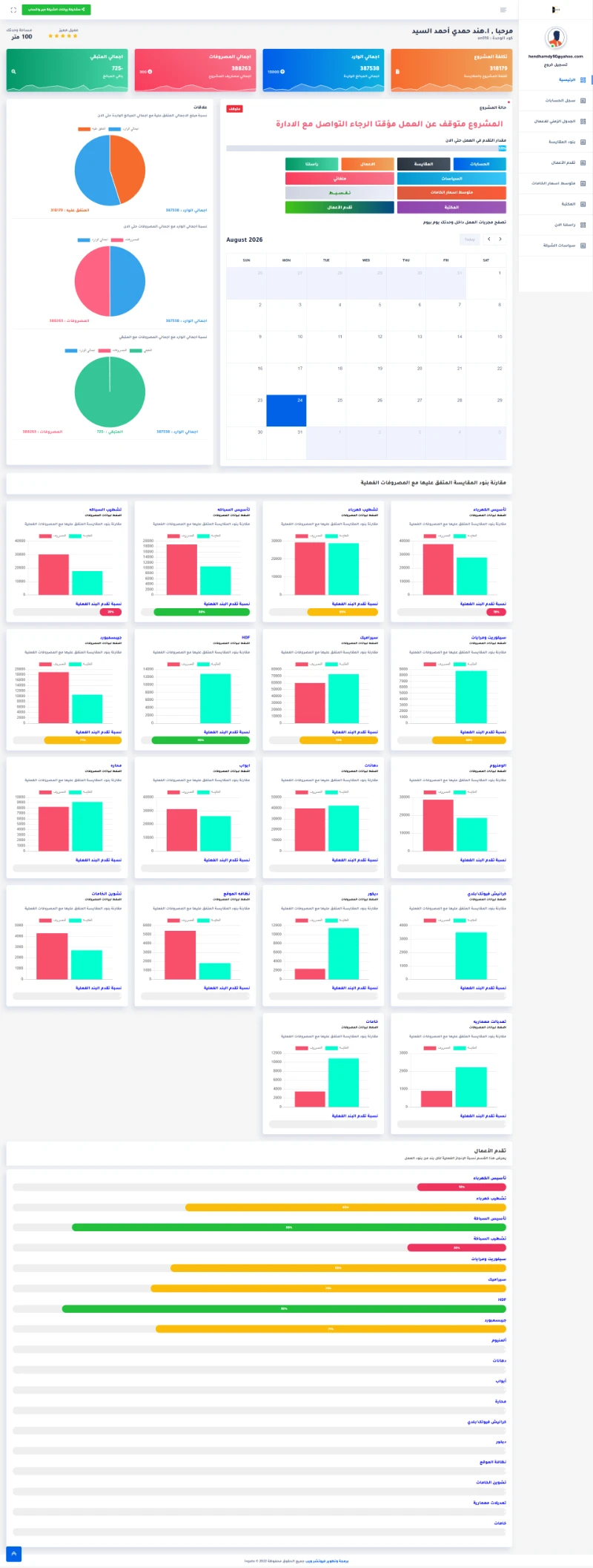
Ingate ERP | Fit-out Project Management System
A custom ERP for a fit-out company connecting projects with client accounts, employees, expenses, and costs while giving management live operational and financial indicators.
- Laravel
- React
- MySQL
- +2
Questions
Questions clients ask about this service
When do I need a desktop app instead of a web system?
When work has to continue without the internet, connect directly to peripherals, or run fast repetitive tasks on fixed computers. In many cases a web system is enough, and we will tell you after reviewing your needs.
Will the software run on Windows and macOS?
It can. We set the required operating systems in the scope and choose a technology that supports them; the software may be built for several systems from one codebase.
Can the software connect to a printer, barcode scanner or scale?
Usually, yes, depending on the device, how it connects and the drivers or interfaces it provides. We check the devices at the start and test the connection before adding it to the scope.
How do updates reach employees’ computers?
We agree on the update mechanism in the scope, such as automatic updates when the app opens, so no computer needs a manual reinstall.
Can data sync between several branches or computers?
Yes, through a central server that syncs data between computers and branches when a connection is available. We define what syncs and when in the scope.
Who owns the software’s code?
It is set out in the contract before work starts. We clarify code rights, licences, access and handover, especially when third-party components or services are used.
Other services
Services you may need with it
Custom Software & Management Systems
A management system or dashboard built around how your business works, bringing your data and your team’s roles into one place.
Mobile App Development
An app for your customers or your team, built around what users actually do and starting with a clear first release.
Server Management & Hosting
A hosting environment that fits your website or system, with monitoring, backups and clear responsibilities.
Ready to start your project?
Share a few details about your business and what you want to achieve, and we will get back to you with the next step.